































IObit Advanced SystemCare Ultimate is a comprehensive tool designed to enhance your computer’s performance and security. It offers a range of features aimed at optimizing system speed and providing robust protection against various threats.
This software provides real-time protection against viruses, spyware, ransomware, and other malware. It also includes tools to clean junk files, optimize startup processes, and update outdated software. Additionally, it offers browser protection to prevent tracking and enhance online privacy.
Important Information about Advanced SystemCare Ultimate
Protect your machines from harmful viruses and enhance system performance in general.
Most recent update: November 13, 2024
6 updates have been made.
IObit Advanced SystemCare Ultimate Overview
IObit Advanced SystemCare Ultimate effectively boosts system performance by removing unnecessary files and managing startup items. Users have reported noticeable improvements in system speed and responsiveness after using the software.
The software features a user-friendly interface with a sleek, dark blue design. The main window is resizable, allowing users to customize their workspace. Navigation is straightforward, with a sidebar providing access to major features. Customization options include theme selection, background image changes, and font size adjustments.
IObit Advanced SystemCare Ultimate offers a straightforward and affordable pricing structure. The basic plan starts at $16.77 for six months, providing access to a comprehensive suite of optimization and security tools. This makes it a cost-effective solution for users seeking to enhance their PC’s performance and security.
The software offers comprehensive system optimization, security features, a user-friendly interface, and affordable pricing plans, but some features require additional downloads and may not be necessary for all users.
IObit Advanced SystemCare Ultimate is a robust solution for users looking to enhance their computer’s speed and security. Its comprehensive features, user-friendly design, and affordable pricing make it a valuable tool for maintaining optimal system performance.
IObit Advanced SystemCare Ultimate Pros & Cons
IObit Advanced SystemCare Ultimate is a popular system optimization and security suite for Windows. Here are the pros and cons when you wish to consider it:
Pros
- Comprehensive Optimization Tools
Offers a wide range of features to clean, optimize, and speed up your PC, including junk file cleaning, startup optimization, registry defragmentation, and more. - Decent Antivirus Protection
Includes an antivirus engine (often using Bitdefender’s database) to protect against malware, spyware, and other threats. - User-Friendly Interface
Generally easy to use, with a clear layout and straightforward options. - Affordable Price
Compared to some competitors, it offers a good value for the number of features included. - Performance Improvement
Many users report noticeable improvements in PC speed and responsiveness after using Advanced SystemCare.
Cons
- Aggressive Marketing
Tries to upsell other IObit products and third-party software, which can be annoying. - Limited Security Features
Lacks some advanced security features found in dedicated antivirus suites, such as a firewall, VPN, and parental controls. - Potentially Overzealous Cleaning
In some cases, it might flag legitimate files or registry entries for cleaning, which could cause issues if not handled carefully. - Effectiveness Varies
The degree of performance improvement can vary depending on the user’s system and existing software. - Privacy Concerns
Some users have raised concerns about IObit’s data collection practices.
Overall
IObit Advanced SystemCare Ultimate can be a useful tool for users looking to improve their PC’s performance and basic security. However, it’s important to be aware of its limitations and potential drawbacks. Consider your specific needs and compare it with other similar products before making a decision.
Recommended for you
Apple Watch Series 2 Charger: 5 Best and Reliable Options
IObit Advanced SystemCare Ultimate Features
IObit Advanced SystemCare Ultimate offers a complete set of tools to improve PC performance and security. It includes powerful features that help clean, optimize, and protect your system.
1. Real-Time Protection Against Threats
IObit Advanced SystemCare Ultimate provides real-time security to protect your computer from viruses, ransomware, and malware. It continuously scans and removes harmful files to keep your system safe.
2. System Optimization for Faster Performance
This software helps boost your PC’s speed by cleaning junk files, managing startup programs, and optimizing system settings. As a result, your computer runs faster and more efficiently.
3. Deep Registry Cleaning
IObit Advanced SystemCare Ultimate scans and cleans the Windows registry to remove unnecessary entries. This reduces system errors and improves overall stability.
4. Privacy Protection & Anti-Tracking
With advanced privacy tools, this software blocks online trackers and erases browsing history. It ensures that your personal data remains secure from hackers.
5. Disk Cleanup & Storage Management
IObit Advanced SystemCare Ultimate removes unnecessary files to free up disk space. It also detects large files that slow down your PC and offers cleanup recommendations.
6. Automatic Software Updates
Keeping your system updated is essential for security and performance. This software checks for outdated applications and helps install the latest versions with one click.
7. Browser Protection & Ad Blocker
It prevents malicious websites from tracking your data and blocks annoying ads while you browse. This enhances both security and online experience.
8. One-Click Maintenance
IObit Advanced SystemCare Ultimate simplifies PC optimization with a one-click solution. It quickly scans and fixes issues, making maintenance easier for all users.
9. Performance Monitoring & Optimization
A built-in performance monitor tracks CPU, RAM, and disk usage. It provides real-time insights and allows users to optimize performance with one click.
10. Enhanced Face ID Protection
The Face ID feature captures images of intruders trying to access your PC. This adds an extra layer of security to your system.
Remarks
IObit Advanced SystemCare Ultimate offers a wide range of features to improve PC speed and security. It is a great solution for users looking for easy and effective system maintenance.
IObit Advanced SystemCare Ultimate Performance
IObit Advanced SystemCare Ultimate is designed to improve PC speed, enhance security, and optimize system performance. It ensures smooth operation by removing junk files, managing startup programs, and protecting against malware.
Faster System Performance
IObit Advanced SystemCare Ultimate boosts system speed by clearing unnecessary files and optimizing background processes. It helps reduce lag and improves overall responsiveness. Many users report noticeable improvements in boot time and application loading speed.
Efficient Junk File Cleanup
Over time, junk files accumulate and slow down a computer. IObit Advanced SystemCare Ultimate scans and removes unnecessary files, freeing up storage space. This feature helps maintain a clean and efficient system.
Improved Startup Optimization
Many programs run automatically when the PC starts, causing delays. IObit Advanced SystemCare Ultimate manages startup items, disabling unnecessary programs. As a result, the system boots up faster and runs more efficiently.
Real-Time Security Protection
This software includes real-time protection against viruses, ransomware, and spyware. It continuously scans for threats and prevents malicious activities. This ensures the system stays secure while maintaining peak performance.
Smooth Browsing Experience
Slow internet speed can be frustrating. IObit Advanced SystemCare Ultimate improves browsing performance by removing tracking cookies, blocking ads, and optimizing network settings. This results in faster page loading and better online security.
Remarks
IObit Advanced SystemCare Ultimate delivers impressive performance by optimizing system speed, cleaning junk files, and enhancing security. It helps users maintain a smooth, fast, and secure computing experience. For those looking for an all-in-one PC optimization tool, this software is a great choice.
IObit Advanced SystemCare Ultimate: Design & User Interface
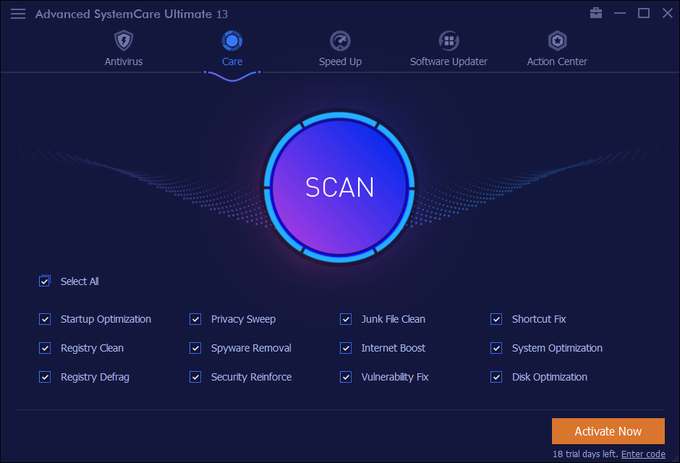
IObit Advanced SystemCare Ultimate offers a sleek and modern design that is easy to navigate. The interface is well-organized, making it simple for users to access different features. With a dark-themed layout and intuitive controls, the software provides a smooth user experience.
Sleek and Modern Design
The overall design of IObit Advanced SystemCare Ultimate is clean and visually appealing. The dark blue theme gives it a professional look. Icons and menus are well-placed, ensuring that users can easily find the tools they need.
Easy Navigation and Accessibility
IObit Advanced SystemCare Ultimate has a straightforward navigation system. A left-side menu provides quick access to all major features. Whether users want to scan for threats, clean junk files, or optimize performance, they can do it with just a few clicks.
Customization Options
Users can personalize IObit Advanced SystemCare Ultimate to match their preferences. The software allows changes in theme colors, font sizes, and background images. These options enhance the user experience by making the interface more comfortable.
One-Click Optimization
A standout feature of IObit Advanced SystemCare Ultimate is its one-click optimization. Users can clean junk files, fix registry errors, and boost performance with a single click. This feature saves time and makes PC maintenance easier.
Clear and Informative Dashboard
The dashboard of IObit Advanced SystemCare Ultimate displays real-time system status. It shows CPU usage, RAM consumption, and storage details in an easy-to-read format. This helps users monitor their PC’s health and take necessary actions.
Remarks
IObit Advanced SystemCare Ultimate delivers a well-designed and user-friendly interface. Its simple navigation, customization options, and one-click optimization make it a great choice for all users. Whether you are a beginner or an advanced user, this software offers an effortless way to maintain your PC.
IObit Advanced SystemCare Ultimate: Pricing and Subscriptions
IObit Advanced SystemCare Ultimate offers flexible pricing to suit different user needs. The software provides a free trial, allowing users to experience its features before committing. After the trial, users can choose from various subscription plans.
Subscription Plans
The standard subscription covers one PC for one year. Additionally, there is an option for a one-year license that covers up to three PCs. This plan is ideal for households or small offices with multiple computers. Prices may vary depending on promotions and the retailer. For instance, PCWorld’s Software Store offers discounts on the software.
Renewal and Refund Policy
Subscriptions are set to auto-renew to ensure continuous protection and optimization. However, users can cancel the auto-renewal at any time through their IObit account or by contacting customer support. IObit also offers a 60-day money-back guarantee. This policy allows users to request a refund if they are not satisfied with the product within this period.
Remarks
IObit Advanced SystemCare Ultimate provides flexible subscription options to accommodate various user requirements. With its free trial, multiple subscription plans, and a generous refund policy, users can choose the plan that best fits their needs.
Specific Review Points to Consider when Getting it
Let’s break down IObit Advanced SystemCare Ultimate reviews based on those specific points. Keep in mind these are general trends gleaned from various user reviews and professional tests; individual experiences can vary.
Installation Process
Generally, the installation is considered straightforward. However, a common complaint is the inclusion of bundled offers, often for other IObit products or third-party software. Users need to pay close attention during installation to opt out of these if they’re not wanted.
User Interface
The interface is usually praised for being user-friendly and intuitive. The layout is clear, and most features are easily accessible. Even less tech-savvy users can typically navigate the program without much difficulty.
Cleaning and Optimization
This is where opinions vary most. Some users report significant improvements in boot times, application loading speeds, and overall system responsiveness. Others see minimal or no noticeable difference. The effectiveness seems to depend heavily on the state of the user’s system before using the software. The registry cleaner, in particular, is a point of contention. While it might find and remove invalid entries, overzealous cleaning can sometimes cause problems. It’s crucial to review the changes before applying them.
Antivirus Capabilities
Advanced SystemCare Ultimate includes antivirus protection, often using the Bitdefender engine. While it generally performs decently in malware detection, it’s not considered a top-tier antivirus solution. It lacks some of the more advanced features found in dedicated antivirus suites, like a robust firewall, advanced anti-phishing tools, and comprehensive real-time protection. It’s best considered a supplemental layer of security rather than a full replacement for a dedicated antivirus program.
Additional Features
Advanced SystemCare comes with a host of additional features, including a software updater, internet booster, performance monitor, and more. The usefulness of these varies. The software updater can be helpful for keeping programs patched, but some users find the other features less valuable. The “internet booster,” for example, often makes minimal difference in internet speed.
System Impact
The impact on system resources is generally low to moderate. While it’s running scans and performing optimization tasks, it can consume more resources, but this is usually temporary. However, some users have reported occasional slowdowns or conflicts with other software.
Support
IObit offers customer support, but the quality of support is mixed. Some users have reported positive experiences, while others have had difficulty getting timely and helpful assistance.
Pricing
Advanced SystemCare Ultimate is relatively affordable compared to some other system optimization suites, especially considering the number of features it offers. This makes it an attractive option for budget-conscious users.
You may like
Is the New Apple Watch Series 10 Worth It? A Detailed Review
Highlights of version 17.1.0.89
- More well-known programs like Steam, GoodSync, GlassWire, Everything, LINE, and Notion can all be updated using Software Updater.
- An expanded database of anti-spyware software can eliminate additional threats to strengthen system security.
- Improved privacy trace cleaning for increased privacy security
- Cleaning garbage files left by Microsoft Store apps is now possible with garbage File Clean.
- Enlarged Surfing Protection database to provide a more secure and seamless online experience
- The new antivirus engine speeds up scans and improves security by optimizing the algorithms.
- A larger database of antivirus software eliminates more dangers, including those that are new and developing, to better safeguard your machine.
- To further secure your privacy, Privacy Sweep eliminates privacy traces from other applications.
- Junk File Clean helps you save up disk space by removing unnecessary files from additional applications.
- Redesigned to make surfing safer and free of intrusive advertisements, Surfing Protection
- A startup optimizer speeds up your computer’s boot time by controlling more initial processes and services.
- Enhancing the automated privacy cleaning to get rid of privacy traces faster is anti-tracking.
- 37 localized languages are supported.
The Takeaway
Advanced SystemCare Ultimate is a decent suite for basic system maintenance and optimization, but its effectiveness can vary. The antivirus component is a helpful addition, but shouldn’t be relied upon as the sole source of protection.
The extra features are a mixed bag. The affordable price makes it worth considering, but it’s essential to manage expectations and be aware of the potential drawbacks. Reading multiple reviews and trying the free trial (if available) are highly recommended before purchasing.
The Review
Advanced SystemCare Ultimate
Real-time protection against ransomware, spyware, viruses, and other malware is offered by this program. It also comes with tools for updating out-of-date software, optimizing starting procedures, and cleaning garbage files. It also provides browser security to improve online privacy and stop tracking.
PROS
- Comprehensive Optimization Tools
- Decent Antivirus Protection
- User-Friendly Interface
- Affordable Price
- Performance Improvement
CONS
- Aggressive Marketing
- Limited Security Features
- Potentially Overzealous Cleaning
- Effectiveness Varies
- Privacy Concerns











Comments 2